Domain SearchInstantly check and register your preferred domain name
 Web Hosting
 cPanel HostingHosting powered by cPanel (Most user friendly)
 KE Domains
 Reseller HostingStart your own hosting business without tech hustles
 Windows HostingOptimized for Windows-based applications and sites.
 Free Domain
 Affiliate ProgramEarn commissions by referring customers to our platforms
 Free HostingTest our SSD Hosting for free, for life (1GB storage)
 Domain TransferMove your domain to us with zero downtime and full control
 All DomainsBrowse and register domain extensions from around the world
 .Com Domain
 WhoisLook up domain ownership, expiry dates, and registrar information
 VPS Hosting
 Managed VPSNon techy? Opt for fully managed VPS server
 Dedicated ServersEnjoy unmatched power and control with your own physical server.
 Website Builder
 Online Store BuilderLaunch a professional e-commerce store without writing code.
 Web Design ServiceGet a custom-designed website tailored to your brand and goals. From just KES 15,600
 BlogRead our guides on web hosting, online business, digital marketing, and more
 SupportOur support guides cover everything you need to know about our services
 ContactContact us via chat or email
These are the days when you wake up to a briefing of your day’s activities and what awaits even before you touch you computer, because you are the boss. How? Well if that is not you, OpenClaw deserves your attention.
OpenClaw is an open-source, autonomous AI agent, that doesn’t wait around for your next message, but acts, connects, and executes on your behalf around the clock.
It hooks into your messaging apps, your browser, your calendar, your files, and your code, so a single text message can trigger a full chain of completed tasks.
What sets it apart is how action-oriented it is. Instead of responding and stopping there, it continues working through connected steps until the task is complete. That means workflows like sending reports, scraping data, scheduling, replying to messages, or updating systems can all run in the background with minimal supervision.
There is one thing to be aware of though: most of these OpenClaw AI assistant capabilities only hold up when the agent runs on infrastructure that never goes offline.
A laptop that sleeps at 10pm, a shared hosting plan with no root access, or a home internet connection that hiccups at 2am, all of these will quietly break the experience.
That is exactly why Truehost built OpenClaw Hosting: a dedicated KVM VPS pre-configured for OpenClaw, with servers in Nairobi so your agent stays on even when you are not.
Now let’s look at these 10 capabilities that carry the most weight in 2026, what each one does, the skill that powers it, and why it works.
10 OpenClaw AI Assistant Capabilities and Their Enabling Skills
1) Inbox Triage and Email Management
Skill: Gmail/Email Integration (or Composio toolkit for broader email tools)
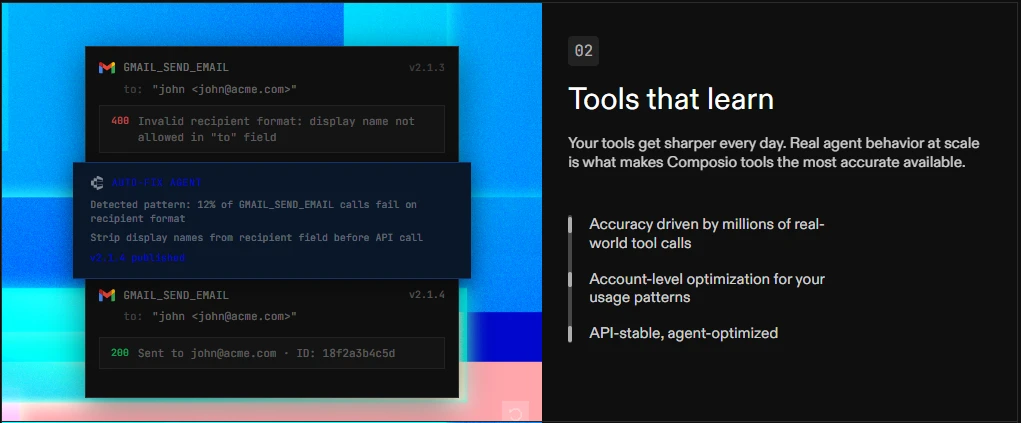
Your inbox can easily become one of the biggest distractions in your day.
With Gmail and email integrations, OpenClaw connects directly to your email accounts and takes care of much of the routine work for you.
It can read incoming messages, sort them by priority, identify emails that need immediate attention, archive low-priority content, draft responses, and summarize long conversation threads.
For example, while sitting in traffic, you could receive a summary of new client proposal emails, approve draft responses from your phone, and have OpenClaw schedule follow-up meetings automatically.
By the time you reach your destination, the conversation is already moving forward.
Over time, OpenClaw’s persistent memory helps it become more effective. It learns:
- How you communicate
- Which contacts deserve priority
- How you typically sign off emails
- What tasks you usually delegate
As a result, the assistant becomes increasingly aligned with the way you work.
To keep inbox management running continuously, OpenClaw needs an environment that stays online around the clock.
Running it on Truehost OpenClaw VPS Hosting ensures your assistant remains active 24/7, processing emails and handling follow-ups even when your devices are turned off.
2) Browser Automation and Web Tasks
Skill: Headless Browser Automation (bundled skill)
One of OpenClaw’s most powerful capabilities is its ability to interact with websites just like a human user.
Using its built-in browser automation skill, it can open websites, navigate pages, click buttons, complete forms, collect information, take screenshots, and carry out multi-step online processes automatically.
A headless Chromium instance receives natural language instructions and carries them out. This allows OpenClaw to handle repetitive web-based tasks that would normally consume valuable time.
Instead of manually checking websites throughout the day, you can simply tell the assistant what to monitor and let it handle the work behind the scenes.
For example, as a business owner, you could instruct OpenClaw to review M-Pesa transaction records every morning and send you a summary through Telegram or WhatsApp. Or as an e-commerce seller you could have it monitor competitor websites and report price changes as soon as they happen.
The assistant can also help with supplier monitoring, market research, data collection, and other routine online activities.
Because browser automation requires consistent computing resources, a VPS provides the stable environment needed to keep these tasks running smoothly.
3) Smart Calendar and Scheduling
Skill: Google Calendar / Outlook Integration (GOG-style unification)
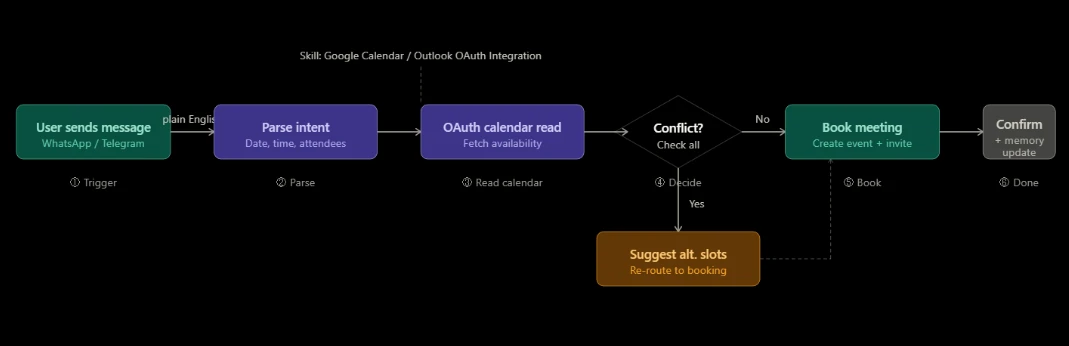
Managing schedules becomes much easier when OpenClaw has access to your calendars. Through Google Calendar and Outlook integrations, the assistant can view availability, identify scheduling conflicts, create events, send reminders, and coordinate meetings across different time zones.
Rather than spending time exchanging messages to find a suitable meeting slot, you can simply tell OpenClaw what you need.
The assistant checks calendars, finds available times, creates invitations, and keeps everyone informed automatically.
This is especially useful for businesses and professionals working with people in multiple locations. A consultant in Nairobi, a client in Kisumu, and a partner overseas can all be coordinated without the usual scheduling back-and-forth.
OpenClaw handles the logistics while you focus on the conversation itself.
4) Local File and System Management
Skill: File Operations + Shell Command Execution (bundled)
OpenClaw can also manage files and perform routine system tasks on the machine where it is installed.
Through its built-in file operation and command execution capabilities, it can read, create, organize, rename, move, and delete files while also running scripts and automated processes.
This turns many repetitive administrative tasks into simple requests. Instead of manually sorting folders or processing files one by one, you can ask OpenClaw to handle them automatically.
It can organize downloads, generate reports, clean up directories, process batches of files, and execute scheduled scripts with minimal supervision.
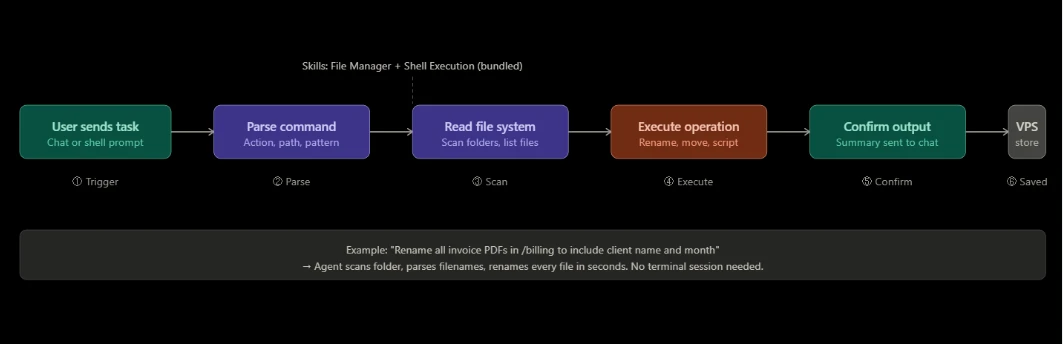
For example, a business owner could have OpenClaw organize monthly receipts into structured folders, rename invoice files according to a consistent format, or generate reports from sales data. Tasks that normally require manual effort can be completed in seconds.
When deployed on a dedicated VPS, OpenClaw gains access to a secure environment for managing server files, backups, application data, and automated workflows. The result is a dependable digital assistant that helps maintain order across your systems while remaining available whenever needed.
5) Cross-App Workspace Integration The GOG Skill
Skill: Google Organized Gateway (GOG) – Google Workspace Unification
The GOG skill is one of the most practical OpenClaw AI assistant capabilities available today. It unifies Gmail, Google Drive, Google Docs, Sheets, Contacts, and Google Calendar into a single natural-language interface.
Instead of jumping between six browser tabs to pull together a client report, you send one message:
“Pull Q1 revenue from the Sheets tracker, summarize the contract PDF in Drive, and email the summary to the team.”
One prompt. Three apps. One result.
The GOG skill authenticates against the full Google API suite simultaneously and dispatches sub-requests in parallel. What would normally require multiple applications and several manual steps becomes a single action.
6) Self-Improving Memory and Personalization
Skill: Persistent Memory / Self-Improving Agent Skill
This is the feature that separates OpenClaw from a standard AI chatbot. The Persistent Memory Skill logs every interaction, from your corrections, preferences, recurring tasks, and past project contexts, into a local vector database.
Every new request pulls the relevant history and adjusts accordingly.
- After you correct the agent’s invoice format twice, it remembers your layout.
- After you tell it to always CC your accountant on financial emails, it does so automatically.
- After you ask it to summarize reports in bullet form rather than paragraphs, it never forgets.
This ongoing learning process allows OpenClaw to adapt to your workflow and become increasingly aligned with the way you operate.
Over time, it evolves into an assistant that feels custom specifically to your business, projects, and daily routines.
Because memory data needs to remain available long-term, hosting OpenClaw on a VPS provides a stable environment where its knowledge base can grow and remain protected through backups and persistent storage.
7) GitHub and Code Automation
Skill: GitHub Integration + Sandbox Code Execution
For developers and technical teams, OpenClaw can act as an automated coding assistant that helps manage development workflows around the clock.
Through GitHub integration and sandboxed code execution, it can interact with repositories, review changes, run tests, troubleshoot issues, and automate repetitive development tasks.
Instead of manually monitoring repository activity, developers can assign routine actions to OpenClaw. The assistant can track pull requests, summarize code changes, identify potential issues, and help streamline review processes before human intervention is needed.
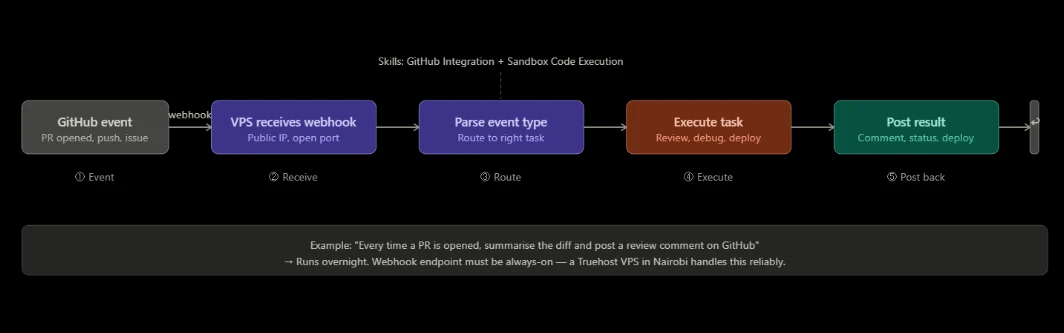
For example, a developer could configure OpenClaw to monitor a repository, generate summaries whenever a new pull request is created, and provide feedback on code changes automatically.
It can also assist with debugging, refactoring code, generating boilerplate components, and supporting deployment workflows.
These capabilities become even more effective when OpenClaw runs continuously on a VPS.
Since repository events, webhooks, and automated workflows can occur at any time, an always-on hosting environment ensures the assistant remains available to respond instantly and keep development processes moving without interruption.
8) Unified Messaging Hub and Multi-Channel Gateway
Skill: Universal Messenger Integration (WhatsApp, Telegram, Slack, Discord)
OpenClaw becomes the one assistant you reach from whichever messaging app you actually use. Each connector runs as a persistent bot listener. Messages from WhatsApp, Telegram, Slack, or Discord get parsed and routed to the right sub-agent.
- A sales rep sends a WhatsApp voice note, then the agent transcribes it and logs key points in the CRM.
- A developer sends a Slack command to trigger a deployment check.
- A manager texts on Telegram to pull a weekly summary report.
Everything flows through one agent.
For this to work, bot listeners need a public IP address and an open port that is always reachable. That is exactly what a Truehost VPS provides, and what a local machine or shared hosting plan simply cannot guarantee. Truehost pre-configured plans make the setup near-instant.
9) Workflow Automation and n8n Integration
Skill: n8n Workflow Automation Skill
OpenClaw becomes even more powerful when combined with n8n, a workflow automation platform designed to connect apps, services, and business processes.
Through its n8n integration, OpenClaw can trigger complex automation workflows from a simple instruction, allowing multiple actions to happen automatically behind the scenes.
Instead of manually moving information between applications, OpenClaw can launch automated workflows that handle data transfers, notifications, approvals, reporting, and other repetitive business processes.
A single request can trigger a chain of actions across multiple tools and platforms.
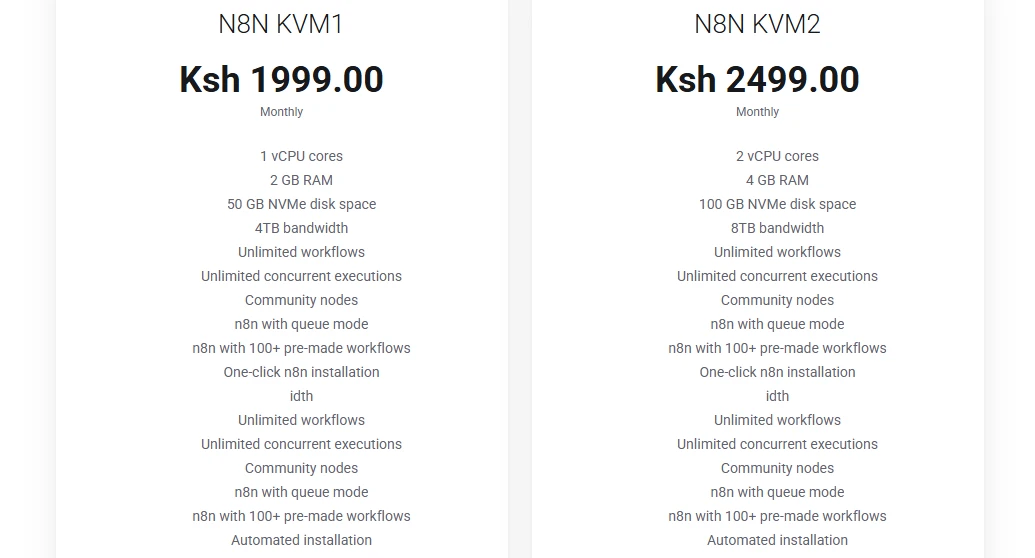
For example, a small business could automate its entire order processing workflow. When a customer completes a payment, OpenClaw can trigger an n8n workflow that generates an invoice, emails it to the customer, records the transaction in a spreadsheet, updates internal records, and sends a notification to the business owner.
What would normally require several manual steps happens automatically within seconds.
This capability helps businesses save time, reduce errors, and create more efficient workflows without building custom software from scratch.
When hosted on a Truehost OpenClaw VPS, both OpenClaw and n8n can work together in a stable environment that supports growing automation needs.
10) Knowledge Summarization and Real-Time Monitoring
Skill: Document Summarization + Web Search/Monitoring (Exa Search / Tavily)
OpenClaw connects to real-time search tools like Tavily to pull live web data well beyond any AI model’s training cutoff. It can also monitor RSS feeds and news sources, then push structured daily briefings straight to your messenger.
“Every morning at 7am EAT, send me a briefing: top three Kenyan fintech stories, any brand mentions, and today’s USD/KES rate.”
That arrives on your Telegram at 7am, assembled automatically, from live sources. It works equally well for summarizing long PDFs, research papers, or industry reports that would otherwise take an hour to read.
For professionals in Nairobi dealing with information overload, this is one of the most immediately useful OpenClaw AI assistant capabilities in the stack.
Scheduled monitoring at a fixed time requires a server with a reliable clock and a persistent connection. Truehost VPS handles both.
Where Should You Host Your OpenClaw AI Assistant?
These OpenClaw AI assistant capabilities deliver the greatest value when the assistant remains online at all times, has reliable access to connected services, and runs on infrastructure designed for continuous automation.
Running OpenClaw on a personal computer introduces several limitations.
If the device is turned off, enters sleep mode, loses internet connectivity, or experiences interruptions, automated workflows stop running. Scheduled tasks can be missed, webhook-based integrations may fail, and public-facing bots can become unavailable.
A dedicated VPS eliminates these issues by providing a stable environment that remains operational around the clock.
Truehost OpenClaw Hosting is designed specifically for this use case and includes:
- Dedicated KVM VPS hosting from KES 1,990 per month
- Fast deployment with OpenClaw-ready environments
- Python 3.12 support and hardened server configurations
- Free SSL certificates for secure connections
- Nairobi-based servers for lower latency across East Africa
- Full root SSH access for complete customization
- NVMe storage for faster performance
- Support for your preferred AI model providers and API keys
- Daily backups to protect configurations, workflows, and memory data
- 24/7 human support when assistance is needed
For developers, agencies, startups, and businesses looking to automate repetitive work, a VPS provides the foundation that allows OpenClaw to operate continuously and reliably.
Instead of functioning only when a personal computer is available, your AI assistant remains active day and night, ready to handle tasks, workflows, monitoring, and integrations whenever they are needed.