Domain SearchInstantly check and register your preferred domain name
 Web Hosting
 cPanel HostingHosting powered by cPanel (Most user friendly)
 KE Domains
 Reseller HostingStart your own hosting business without tech hustles
 Windows HostingOptimized for Windows-based applications and sites.
 Free Domain
 Affiliate ProgramEarn commissions by referring customers to our platforms
 Free HostingTest our SSD Hosting for free, for life (1GB storage)
 Domain TransferMove your domain to us with zero downtime and full control
 All DomainsBrowse and register domain extensions from around the world
 .Com Domain
 WhoisLook up domain ownership, expiry dates, and registrar information
 VPS Hosting
 Managed VPSNon techy? Opt for fully managed VPS server
 Dedicated ServersEnjoy unmatched power and control with your own physical server.
 Website Builder
 Online Store BuilderLaunch a professional e-commerce store without writing code.
 Web Design ServiceGet a custom-designed website tailored to your brand and goals. From just KES 15,600
 BlogRead our guides on web hosting, online business, digital marketing, and more
 SupportOur support guides cover everything you need to know about our services
 ContactContact us via chat or email
While you’re saying “Hey Google, set a reminder,” your competitor’s OpenClaw agent has already researched suppliers, drafted follow-up emails, and summarized the week’s leads, without waiting for a prompt.
Thing is, most people already know and use Google Assistant. It comes on your phone, it answers questions, and for a lot of daily moments, that’s genuinely enough.
But OpenClaw is a different category of tool entirely, not a better voice assistant, but an autonomous AI agent built to work while you’re busy doing other things.
So which one is actually better for you?
Well, that depends entirely on what you need AI to do. Now, let’s breaks both tools down to details so you can make that call for yourself.
OpenClaw vs Google Assistant Comparison Table
| Google Assistant | OpenClaw | |
|---|---|---|
| Definition | Google’s built-in AI voice assistant, available on billions of Android devices, Nest speakers, and smart displays | An open-source autonomous AI agent designed to execute complex, multi-step workflows without waiting for your next command |
| Primary Function | Reactive voice commands and quick single-step queries | Autonomous execution, deep reasoning, and cross-app workflows |
| Privacy | Cloud-first; all interactions processed on Google’s servers | Self-hosted; your data stays on your device or preferred server |
| Setup | Zero setup – works out of the box on Android | Requires install; or use managed hosting (e.g. Truehost) for 1-click deploy |
| Cost | Free | Free + API costs (~$5–20/mo); managed hosting from KES 1,999/mo |
| Best For | Quick voice convenience, smart home control, Google ecosystem users | Autonomous workflows, privacy-conscious users, cross-app business automation |
The table gives you the snapshot. Now let’s go deeper into what these differences actually mean in practice.
OpenClaw vs Google Assistant: Features
Moving from surface-level comparison, these are the real-world capability differences.
1) Autonomy and Workflows
Google Assistant is reactive, meaning it waits for you. OpenClaw is proactive, meaning it executes.
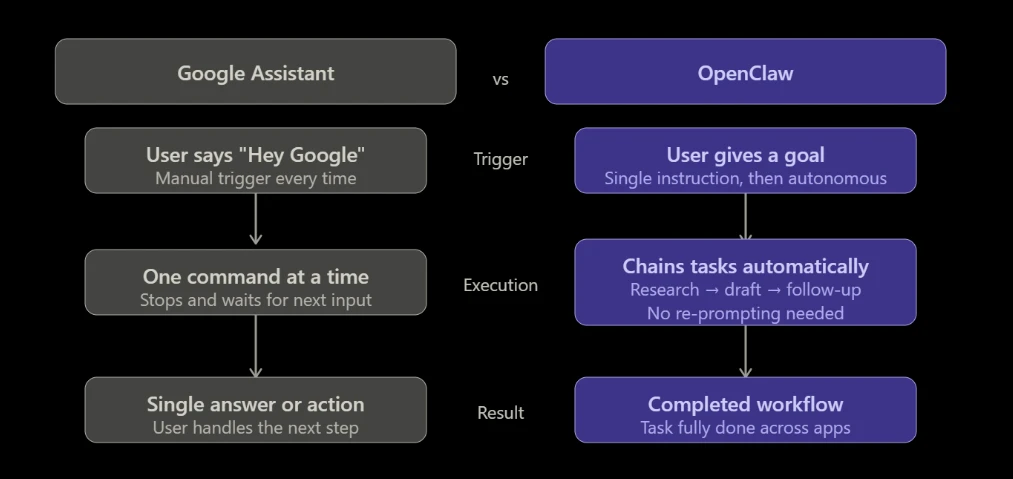
Google Assistant handles one command at a time. Ask it to chain tasks like “check my calendar, find a free slot, and email John,” and it either fumbles or drops you back into manual territory.
That’s not a flaw in the product. It was designed for convenience, not execution. Every interaction starts with “Hey Google,” gets a response, and then stops. The next step is yours.
OpenClaw works the other way entirely. Give it a goal and it runs with it, all without you prompting it at every turn:
- Monitoring your inbox
- Conducting research
- Drafting replies
- Completing follow-ups across multiple apps
For SMEs managing clients, suppliers, and logistics across apps simultaneously, this is the difference between an assistant who answers calls and one who actually runs the errands.
If you’re a Kenyan entrepreneur juggling WhatsApp threads, email, spreadsheets, and client requests at the same time, this is your sign.
2) Privacy and Data Control
Every “Hey Google” is recorded and processed on Google’s servers, but OpenClaw keeps your data under your roof.
Google Assistant is cloud-first, meaning your voice, your queries, your calendar data, and your email access all route through Google’s infrastructure and contribute to your data profile.
For personal convenience tasks, most people are comfortable with that trade-off and never think twice about it.
For businesses handling sensitive client data, financial records, or competitive information, it deserves a second look.
OpenClaw can be run entirely self-hosted, that is, the only data that leaves your environment is your API call to your chosen AI provider, and even that can be routed through privacy-focused options.
At Truehost, Kenya-based hosting adds another layer: your OpenClaw instance runs on local infrastructure, not a distant data center on the other side of the world. For any business where data confidentiality is a real concern, this is crucial.
3) Integrations and Flexibility
Google Assistant lives inside Google’s walls. OpenClaw connects to virtually any tool you already use.
Google Assistant integrates natively with Gmail, Google Calendar, Google Drive, and Google Home, and inside that ecosystem, it’s genuinely seamless.
Step outside it though, and its usefulness drops sharply. If your business runs on Outlook, stores files in Notion, or communicates primarily on WhatsApp, Google Assistant was simply not built for your world.
But OpenClaw was.
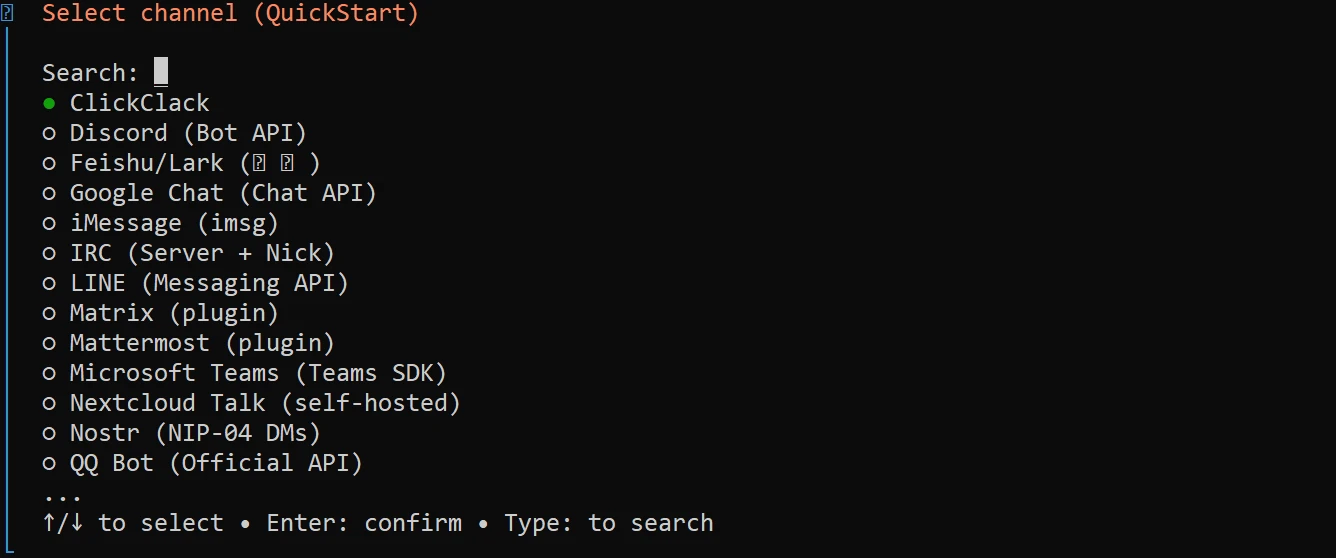
It integrates with WhatsApp, Telegram, Discord, Slack, Notion, Outlook, and more, mainly the platforms Kenyan professionals and SMEs already rely on daily.
WhatsApp is the business communication backbone in Kenya, and it’s not a secondary channel, but where deals get done.
The fact that OpenClaw operates inside WhatsApp, accepting instructions and returning results in the same thread where work actually happens, is a practical advantage that Google Assistant cannot match.
OpenClaw is also model-agnostic. You choose the AI brain: Claude, GPT-4, Gemini, or another provider entirely. When a better model arrives, you switch immediately, without waiting for Google to push an update.
4) Smart Home and Voice Commands
This is Google Assistant’s genuine home turf, and it deserves credit for it.
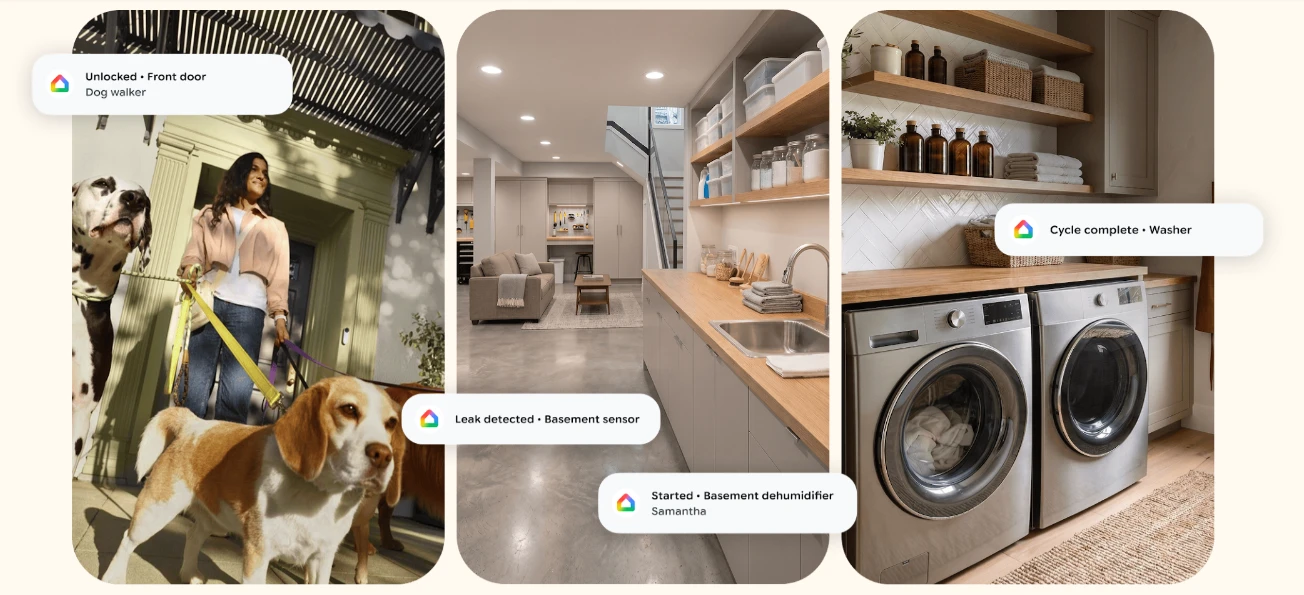
Google Assistant has unbeatable compatibility with thousands of IoT devices, from Nest products, Philips Hue, smart locks, smart displays, thermostats, and more, all working out of the box.
Its voice recognition is genuinely best-in-class, shaped by billions of users across accents, noise conditions, and unusual words.
If you need to lock the door, turn off the lights, set a timer while cooking, or get a quick hands-free answer, Google Assistant is the right tool for the job. Fast, reliable, and it asks nothing of you.
OpenClaw can be configured to handle smart home tasks, but it requires more manual setup and custom API integrations. It is not the right tool for “Hey, turn off the bedroom lights.”
If smart home control and hands-free voice commands are your primary use case, Google Assistant wins this round cleanly. But most business and productivity work doesn’t happen by voice, it happens in text, in apps, and in workflows.
5) Memory, Context, Cost, and Setup
OpenClaw remembers you. Google Assistant mostly doesn’t. And the cost difference is smaller than most people expect.
Memory and Context
Google Assistant’s memory is limited and inconsistent.
It might know your home address, but it won’t remember last month’s conversation about your supplier negotiation, that you prefer morning meetings, or that a particular client always needs a follow-up after three days. Each session largely starts fresh.
OpenClaw maintains a complete conversation history and builds genuine contextual understanding over time. It learns your preferences, your recurring tasks, your working style.
For recurring business workflows, this transforms simple queries into personalized, evolving assistance, and less of a tool you instruct and more a system that anticipates what you need next.
Cost and Setup
Google Assistant is free, with zero setup. It’s already on your Android device.
OpenClaw is open-source and free to self-host, with API costs of roughly $5–20 per month depending on usage, which is about the cost of a lunch in Nairobi for a full month of autonomous AI support.
The setup curve is the main friction point for most users, and that’s where we at Truehost come in.
Our managed OpenClaw VPS Hosting eliminates that barrier entirely, with a pre-configured environment with 1-click AI automations, no server management required, priced in KES, with local support.
For what amounts to a full-time autonomous AI working in the background of your business, it’s a negligible cost.
Which One Is Right for You?
Choose Google Assistant if:
- You want zero setup on your Android device
- You’re fully inside the Google ecosystem, that is, Gmail, Drive, Google Home
- Fast, hands-free voice commands are your primary use case
- You just need Gemini-powered help natively inside your existing Google apps
Choose OpenClaw if:
- You need an AI that executes tasks autonomously, not just answers questions
- You use tools outside Google, like WhatsApp, Slack, Notion, Outlook
- You prioritize data privacy and don’t want your interactions routed through Google’s servers
- You run a business and need cross-app automation without hiring extra staff
- You want to choose and switch your own AI model freely
Many professionals run both side by side, Google Assistant for quick voice moments like driving, cooking, and smart home control, and OpenClaw as the tireless autonomous “employee” handling deeper research, automation, inbox management, and cross-app workflows.
In the OpenClaw vs Google Assistant matchup, the real winner depends entirely on what you need AI to do.
OpenClaw vs Google Assistant FAQs
Is OpenClaw free?
The open-source version is free to self-host. API usage costs roughly $5–20 per month depending on how heavily you use it. Managed hosting through Truehost starts at KES 1,999/mo, pre-configured and ready to run from day one.
Does OpenClaw work in Kenya?
Yes. Truehost’s OpenClaw Hosting is built specifically for the Kenyan market, KES pricing, M-PESA compatible, and backed by local support.
Is OpenClaw better than Google Assistant?
For autonomous workflows, data privacy, and multi-step execution, yes. For quick voice commands and smart home control, Google Assistant still leads. Most professionals find that the two tools complement each other rather than compete.
Can I use OpenClaw on WhatsApp?
Yes. OpenClaw integrates natively with WhatsApp, Telegram, and Discord, meaning you can give instructions and receive results directly inside the same apps where your work already happens.
Can I run both Google Assistant and OpenClaw?
Absolutely, and many professionals do. Google Assistant handles voice convenience; OpenClaw handles business-grade automation. Running both costs very little and covers far more ground than either tool alone.
How to Get Started with OpenClaw in Kenya
Self-hosting OpenClaw has a setup curve , with server configuration, environment variables, and API key management, but it doesn’t have to be your problem.
Truehost eliminates that barrier with fully managed OpenClaw VPS Hosting, deployed in minutes, priced in KES, and backed by local support.
No server skills needed. No command-line headaches. Just a working autonomous AI agent on reliable Kenyan infrastructure, ready to connect to your apps from day one.
Two plans to match your scale:
- OpenClaw KVM1 – KES 1,999/mo: 1 vCPU, 2 GB RAM, 50 GB NVMe, 4 TB bandwidth, pre-configured OpenClaw with 1-click AI automations
- OpenClaw KVM2 – KES 2,699/mo: 2 vCPU, 4 GB RAM, 100 GB NVMe, 8 TB bandwidth, for heavier workloads and growing teams
Pre-configured means no server management. You deploy, connect your apps, and start giving instructions.